Published on Roblox Creator Store by @riftkuro (with Seven) • Verified Asset ID: 86116556258301 • Initial Launch: 0 Robux on Store
ECLIPSE ANIMATOR FOR ROBLOX STUDIO
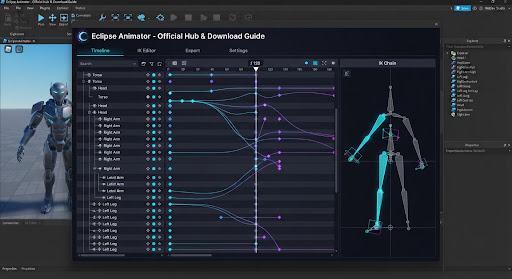
The advanced keyframe studio suite, real-time inverse kinematics engine, and Blender curve pipeline created by @riftkuro and @seven for Roblox Studio. Built for complex combat choreography, cutscenes, and sub-frame animation.
Platform Notice: eclipseanimator.app is an independent community tutorial and controls reference site. Eclipse Animator is a desktop plugin executed directly inside Roblox Studio. This site provides verified installation guidance, keybind lookups, and workflow benchmarks.
Verified Plugin Link & Asset ID Checker
Paste any Roblox Creator Store URL, rbxassetid:// URI, or raw numeric ID. This utility checks whether the link targets the authentic Creator Store record by developer @riftkuro (86116556258301) to protect developers from counterfeit toolbox uploads containing obfuscated require() backdoors.
Transparency Disclaimer: This link checker verifies destination identity against riftkuro's published Creator Store record. Link validation confirms the target URL opens the verified publisher's page; it is not a substitute for reviewing permissions inside Roblox Studio.
Eclipse Animator vs Moon Animator 2
| Comparison Metric |
Eclipse Animator (riftkuro & seven)
|
Moon Animator 2 (Classic Standard) |
|---|---|---|
| Store Price | 0 Robux promotional release window on Creator Store | 1,700 Robux (~$20 USD) on Creator Store |
| Animation Layers | Native Additive & Override layers (combat moves blend over walk cycles) | Single flat timeline; requires splitting into separate project files |
| Inverse Kinematics (IK) | Real-time Fabrik IK with pole target constraints & joint pinning | Traditional 2-bone solver; requires manual anchor baking |
| Graph Editor (Easing) | Visual Bezier tangent handles (custom acceleration curves like Blender) | Preset easing styles (Quad, Cubic, Bounce, Back) & 7-key value graph |
| Dynamic Hierarchy / Parenting | Built-in Dynamic Parenter (unparent or swap weapons/items on the fly) | Requires manual Motor6D weld scripts or discrete accessory tracks |
| Blender Companion | Dedicated companion tool (riftkuro/eclipse-blender) with 2-way sync | Third-party community scripts with occasional rotation order mismatches |
| Video Reference Sync | Companion app (riftkuro/eclipse-video) syncs video reference to timeline | Not available natively; requires manual video player window alignment |
| Learning Curve | Steeper for beginners due to deep Blender-like feature set | Familiar and established; hundreds of community YouTube tutorials exist |
Eclipse Animator Keyboard Shortcut Search
Insert Keyframe on Selected Joint
Press V in Eclipse to record position and orientation transforms on highlighted bones (unlike Moon's + or spacebar).
Delete Selected Keyframe(s)
Quickly removes highlighted keyframe markers from the active track without opening context menus.
Scale & Retime Keyframes
Select a cluster of keyframes and press J to scale timing proportionally forward or backward.
Play / Pause Timeline Playback
Toggles playback loop. Tap twice to return playhead scrubber to loop in-point.
Toggle Inverse Kinematics (IK) & Forward Kinematics (FK)
Switches between FK bone rotation handles and real-time Fabrik IK solvers with pole vector angle constraints.
Toggle Graph Editor (Bezier Curve Handles)
Opens visual curve editor with independent left and right Bezier tangent handles for custom acceleration curves.
No matching shortcuts found. Try searching for "keyframe", "curve", "IK", or "layer".
How to Install in 60 Seconds
Open Roblox Studio
Launch Roblox Studio on your PC or Mac and open any existing game project or a standard Baseplate.
Search Creator Store
In Toolbox or Creator Store, filter by Plugins and search Eclipse Animator or paste Asset ID 86116556258301 by @riftkuro.
Click Install
Click Install. Studio will prompt for script execution permissions required for procedural inverse kinematics and viewport bones.
Select Rig & Press Ctrl+E
Select any R15 or R6 rig in the workspace, then click Eclipse Animator in the Plugins ribbon or press Ctrl + E.
Frequently Asked Questions About Eclipse Animator
Clear, fact-checked answers regarding platform requirements, official plugin IDs, pricing, and project migration.
What is Eclipse Animator and can I animate directly on this website? expand_more
eclipseanimator.app) is an independent community portal providing guides, keybind tools, and workflow comparisons. You cannot animate directly in your web browser.
What is the real Roblox Creator Store Asset ID for Eclipse Animator? expand_more
86116556258301, published by @riftkuro. Be cautious of counterfeit toolbox re-uploads on the marketplace that copy the name but may contain malicious scripts or backdoors. Use our on-page Link Checker to confirm links point to the authentic creator.
Is Eclipse Animator free or does it cost Robux? expand_more
How do I migrate my existing Moon Animator projects to Eclipse? expand_more
KeyframeSequence instances stored in ServerStorage or character models. You can import your saved Moon keyframes into Eclipse's timeline to adjust Bezier curve tangents or add animation layers without losing timing data.
Can I export animations for in-game combat and cutscenes? expand_more
KeyframeSequence and modern CurveAnimation tracks. You can right-click the exported track in Studio to publish it to Roblox as an Animation Asset ID, which can then be played via Humanoid.Animator:LoadAnimation() or AnimationController.