Published on Roblox Creator Store by @riftkuro • Asset ID: 86116556258301 • Initial Store Release: 0 Robux
ECLIPSE ANIMATOR FOR ROBLOX STUDIO
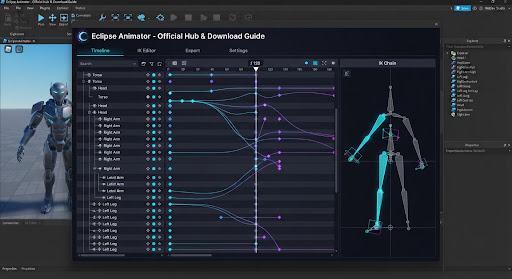
The next-generation keyframe studio suite, real-time Inverse Kinematics engine, and zero-loss Blender workflow for Roblox Studio animators. Built for combat choreography, cinematic cutscenes, and organic motion.
Platform Clarification: Eclipse Animator is a Roblox Studio plugin (Asset ID 86116556258301 by @riftkuro) executed inside the Roblox Studio desktop client. This website provides verified downloads, interactive shortcut lookups, anti-phishing link checking, and workflow guides.
Verified Plugin Link & Asset ID Checker
Paste any Roblox Creator Store URL, rbxassetid:// URI, or raw numeric ID. This tool checks whether the link targets the authentic publication by @riftkuro (86116556258301) to protect you against malicious toolbox clones containing obfuscated require() backdoors.
Transparency Disclaimer: This link checker verifies destination identity against riftkuro's published Creator Store record. Link validation confirms you are opening the authentic author's listing; when running plugins inside Roblox Studio, always inspect permissions requested by the Studio environment.
Eclipse Animator vs Moon Animator 2
| Workflow Feature |
Eclipse Animator (2026 Suite)
|
Moon Animator 2 (Classic Legacy) |
|---|---|---|
| License & Cost | 0 Robux (Free initial release on Creator Store) | Paid (1,700 Robux / ~$20 USD on Creator Store) |
| Animation Layers | Native additive & override layers (non-destructive combat blending) | Flat timeline; requires splitting into separate project files |
| Inverse Kinematics (IK) | Real-time multi-joint Fabrik IK with live pole targets and viewport pinning | Basic 2-bone solver; requires manual anchor keyframe baking |
| Graph Editor (Easing) | Visual Bezier curve handles (independent left/right tangent manipulation) | Discrete easing style presets & basic 7-key value graph |
| Camera Cutscene Tools | Integrated viewport Camera Track (keyframable FOV, roll & target focus) | Separate Moon Camera tool running in a distinct sub-window |
| Blender Data Exchange | Direct JSON & FBX curve roundtrip maintaining Motor6D bone map | Community scripts with occasional Euler/Quaternion rotation mismatches |
| Live Collaboration | Team Create collaborative editing session support | ServerStorage file locking conflicts during simultaneous sessions |
Eclipse Animator Keyboard Shortcut Search
Play / Pause Timeline Playback
Press Space to toggle 120 FPS playback scrub. Scrub head resets to in-point on second tap.
Insert Keyframe on Selected Joint
Instantly records transform channels (Position & Orientation) for highlighted bone selection.
Toggle Graph Editor & Bezier Curves
Opens sub-frame curve editor. Manipulate left and right Bezier handles to adjust physics weight.
Switch Inverse Kinematics (IK) & Forward Kinematics (FK)
Toggles Fabrik multi-joint IK solver. Drag feet and hands; limbs resolve anatomically with pole vectors.
Toggle Onion Skinning Ghost Poses
Projects semi-transparent ghost frames 2 steps before and after playhead for spacing analysis.
Add Animation Layer (Additive / Override)
Creates a non-destructive layer. Keep run cycle on Layer 0 and animate sword slashes on Layer 1.
No matching shortcuts found. Try searching for "keyframe", "curve", "IK", or "layer".
How to Install in 60 Seconds
Open Roblox Studio
Launch Roblox Studio on your PC or Mac and open any existing game project or a standard Baseplate.
Search Creator Store
In Toolbox or Creator Store, search Eclipse Animator or paste Asset ID 86116556258301 by @riftkuro.
Click Install
Click Install. Studio will prompt for script execution permissions required for procedural inverse kinematics calculations.
Select Rig & Press Ctrl+E
Select any R15 or R6 rig in the workspace, then click Eclipse Animator in the Plugins ribbon or press Ctrl + E.
Common Questions About Eclipse Animator
Answers regarding platform requirements, official plugin IDs, pricing, and project migration.
What is Eclipse Animator and can I animate directly on this website? expand_more
eclipseanimator.app) is an independent community portal that provides installation tutorials, verified link validation, Blender pipelines, and shortcut tools. You cannot animate directly inside a web browser; animations are created inside Roblox Studio.
What is the real Roblox Creator Store Asset ID for Eclipse Animator? expand_more
86116556258301, published by creator @riftkuro. Beware of unverified toolbox re-uploads that clone the name "Eclipse Animator" but contain malicious backdoors or place stealers. Always use our on-page Link Checker to verify you are installing the original plugin.
Is Eclipse Animator completely free or will it cost Robux? expand_more
How do I migrate my existing Moon Animator projects to Eclipse? expand_more
KeyframeSequence instances stored in ServerStorage or rig models. You can import your saved Moon animations directly into Eclipse's timeline without losing keyframe timing or bone rotation data.
Can I export animations for in-game combat and cutscenes? expand_more
KeyframeSequence and modern CurveAnimation tracks. You can right-click the exported track in Studio to publish it to Roblox as an Animation Asset ID, which can then be played via Humanoid.Animator:LoadAnimation() or AnimationController.